QUEENS, NY (09.18.26) – Talk to someone who has owned a BMW for ten years and you will rarely hear complaints about the car itself. The engine still pulls the way it did on the test drive. The seats and materials have worn in, not worn out. The steering still communicates the road the way BMW intended. These are vehicles engineered to be kept, and their owners keep them, often well past the decade mark.
Then there is the screen.
If you drive an older BMW, you have probably asked at least one of these questions: Can I add Apple CarPlay or Android Auto to my BMW? Can I replace the small factory screen with something larger? Is there a way to modernize the technology without tearing out the factory radio and losing iDrive? The answer to all three is yes, and it does not involve compromise. This article explains how BMW infotainment upgrades work, why BMWs are uniquely suited to them, and what to look for in a solution.
Why BMW Owners Keep Their Cars
BMWs age exceptionally well. The powertrains are built for the long haul, the interiors hold their look and feel, and the driving dynamics that convinced you to buy the car do not fade with the odometer. A well-maintained 3 Series or X5 from the early 2010s still feels special in a way few of its contemporaries can match.

The technology inside it is another story. Infotainment moves on a consumer-electronics timeline, not an automotive one. A dashboard that was state of the art when the car was new can feel a full generation behind within five or six years. The result is a strange mismatch familiar to almost every long-term BMW owner: a car that still drives like new, paired with a screen that reminds you of its age every time you start it.
The Screen Problem Every BMW Owner Knows
The frustrations tend to pile up in the same order. The factory display, often just 6.5 or 8.8 inches, looks small next to any modern smartphone. It is not a touchscreen. There is no Apple CarPlay or Android Auto, so calls, messages, music, and navigation all run through an interface designed before those services existed. The factory navigation maps are outdated, and updating them is neither cheap nor convenient. Menus that once felt responsive now feel sluggish.
Then there are the screens that fail outright. Many BMW owners know the dreaded black dot: a dark blotch that appears near the center of the display and slowly spreads as the screen’s internal layers separate. It is a well-documented issue, and dealers typically quote a full screen replacement at a price that makes owners wince. Add in fading, delamination, and dead pixels, and plenty of otherwise excellent BMWs are driving around with displays their owners actively avoid looking at.

The car is still fantastic. The infotainment is not.
Why Swapping the Radio Is the Wrong Answer in a BMW
In an older truck or an economy car, the traditional fix is simple: pull the factory radio and install an aftermarket head unit. In a BMW, that approach falls apart quickly, because a BMW is not built like those vehicles. It is engineered as one integrated system.
The iDrive controller on the console, the vehicle settings menus, the parking sensors, the steering wheel controls, the factory Bluetooth, and the factory microphone all run through the same electronics that drive the display. Remove the factory radio and you are not just replacing a stereo; you are cutting into a network the rest of the car depends on. Aftermarket workarounds exist, but they trade away the seamless integration that makes a BMW feel like a BMW. As we covered in our overview of screen replacement technology, the smarter path for integrated luxury vehicles is to upgrade the display and leave the factory electronics alone.

Replace the Display, Not the Vehicle
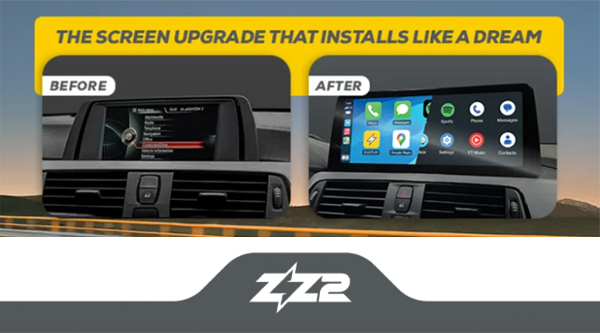
This is exactly the philosophy behind the DIZZPLAY line of BMW screen upgrades from ZZ2. Instead of replacing the radio, a DIZZPLAY system replaces only the screen with a larger, modern 10.25-inch HD touchscreen designed for your specific BMW, while the factory electronics keep doing their jobs.

Everything you rely on stays factory:
- The iDrive controller
- Vehicle settings and menus
- Steering wheel controls
- Factory Bluetooth
- The factory microphone
- The OEM appearance of the dashboard
And everything you have been missing gets added:
- Wireless Apple CarPlay
- Wireless Android Auto
- A large anti-glare HD touchscreen
- zOS, ZZ2’s fast-booting Linux-based operating system
- Full touch operation alongside the iDrive controller
- USB media playback
- Optional front and rear camera support on supported models

Every DIZZPLAY system is backed by a three-year warranty with U.S.-based technical support, and installation through an authorized retailer is plug-and-play, with no cutting or splicing of the factory harness.
Fit and Finish That Belongs in a BMW
For most BMW owners, the deciding factor is not the feature list. It is the question of whether an upgrade will look like it came from the factory. Plenty of aftermarket products work well enough but announce themselves the moment you open the door: mismatched trim, odd angles, a screen that looks bolted on rather than built in.
A BMW display upgrade has to clear a higher bar, and this is where DIZZPLAY separates itself. The housing follows the factory lines of the dash, the finish matches the factory styling, and the larger display complements the dashboard rather than dominating it. Passengers notice a bigger, sharper screen. What they do not notice is anything out of place. The goal is a vehicle that looks the way BMW would have built it, if this technology had existed when the car was designed.
Which BMWs Can Be Upgraded?
DIZZPLAY covers the four infotainment platforms BMW used across two decades: CCC, CIC, NBT, and EVO. In practical terms, that means support for a broad range of vehicles from the 2004 through 2023 model years, including the 1 Series, 2 Series, 3 Series, 4 Series, 5 Series, 6 Series, and 7 Series, the X1, X2, X3, X4, X5, and X6, and the Z4.

Whether you need an NBT screen replacement for a 2015 3 Series, an EVO screen upgrade for a 2018 X3, or a CIC upgrade for an older 5 Series, the fastest way to confirm exact fitment is ZZ2’s BMW compatibility guide, which matches systems to specific models, years, and platforms.
Your BMW Still Drives Like New. Now It Can Feel Like New.
BMW built your car to last, and it has. There is no reason the technology inside it should force the issue. A DIZZPLAY upgrade modernizes the one part of the vehicle that ages fastest while preserving everything that made you keep it: the factory integration, the factory character, and the drive itself.
To find the right system for your BMW, visit ZZ2’s compatibility guide or contact ZZ2 to get connected with an authorized retailer near you.
Don’t forget to follow ZZ2 on Facebook, Instagram, and YouTube to stay up to date on new product releases and installation videos.